

Cybersecurity Awareness Training
Today, cyberattacks are more common than ever before. From phishing and ransomware attacks to insider threats and cyber espionage, your organization can become the target of a wide range of cyber threats. To protect your company’s sensitive information, it’s essential to educate your employees about cybersecurity best practices.
This cybersecurity awareness training offers an overview of key concepts that every employee should understand to help them identify and mitigate cyber threats. Participants will learn about different types of cyberattacks, how to recognize suspicious emails and websites, how to create strong passwords, and how to use multi-factor authentication. They will also learn about the importance of safe browsing habits, data privacy, and security hygiene.
Course Objectives
Upon completing this cybersecurity awareness training, participants will be able to:
– Recognize common types of cyber threats and attacks
– Understand the risks associated with social engineering and phishing attacks
– Identify suspicious emails and websites
– Create strong passwords and use multi-factor authentication
– Follow safe browsing habits and understand the importance of data privacy and security hygiene
Curriculum
Introduction to Cybersecurity
Overview of cybersecurity threats and risks
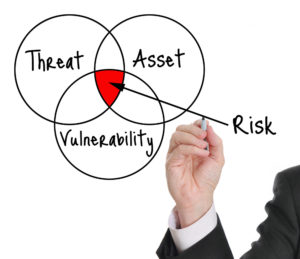
Cybersecurity Threats and Risks: An Overview
The digital age comes with a constant barrage of cyber threats and risks. These can disrupt operations, steal valuable data, or cause financial harm. Here’s a basic breakdown:
Cybersecurity Threats:
These are malicious actions by individuals or groups aimed at exploiting vulnerabilities in computer systems and networks. Common threats include:
- Malware: Malicious software like viruses, worms, trojans, ransomware, and spyware. These can steal data, corrupt systems, or hold data hostage for ransom.
- Social Engineering: Manipulation tactics to trick users into giving away sensitive information or clicking malicious links. Phishing emails are a prime example.
- Denial-of-Service (DoS) Attacks: Overwhelming a system with traffic to prevent legitimate users from accessing it.
- Man-in-the-Middle (MitM) Attacks: Eavesdropping on communication channels to steal data like passwords or credit card information.
- Password Attacks: Guessing, cracking, or brute-forcing passwords to gain unauthorized access.
- Advanced Persistent Threats (APTs): Highly sophisticated attacks by skilled attackers targeting specific organizations for long-term data theft.
- Supply Chain Attacks: Targeting vulnerabilities in software or hardware suppliers to gain access to a wider network.
Cybersecurity Risks:
These are the potential negative consequences of cyber threats. The severity of a risk depends on the type of threat and the potential impact on an individual or organization. Here are some examples:
- Data Breaches: Unauthorized access to sensitive data like financial records, personal information, or intellectual property.
- Financial Loss: Theft of money through fraudulent transactions or extortion via ransomware attacks.
- Disruptions: Operational disruptions due to system outages caused by cyberattacks.
- Reputational Damage: Loss of public trust and brand image due to a security breach.
By understanding these threats and risks, individuals and organizations can take steps to improve their cybersecurity posture. This can involve:
- Implementing strong passwords and multi-factor authentication.
- Installing security software and keeping it up-to-date.
- Educating employees about cyber threats and best practices.
- Regularly backing up data.
- Having a plan for incident response and recovery.
Staying vigilant and proactive is crucial in today’s digital landscape.
Understanding the importance of cybersecurity awareness
Cybersecurity awareness is fundamental in today’s world, where we increasingly rely on technology and share sensitive information online. Here’s why it’s so important:
-
Human Element in Cyber Attacks: Many cyberattacks exploit human vulnerabilities. Phishing emails rely on people clicking malicious links, while social engineering tactics trick users into revealing passwords. Educated users become a stronger defense against such attacks.
-
Protecting Yourself and Others: By being aware of cyber threats, you can protect yourself from malware, financial scams, and identity theft. This awareness also helps safeguard the security of your loved ones and colleagues who may not be as tech-savvy.
-
Stronger Organizations: In businesses, employees are often the weakest link in cybersecurity. Cyber awareness training equips them to identify threats, avoid suspicious activity, and report potential breaches. This significantly reduces the organization’s risk of costly attacks and data breaches.
-
Privacy and Security: Understanding cybersecurity empowers you to make informed decisions about your online behavior. You can choose strong passwords, be cautious about what information you share online, and browse the web securely.
-
Mitigating Risks: Cybersecurity awareness isn’t just about defense. It also helps you understand the potential risks associated with using technology. This allows you to take proactive measures like backing up data regularly and using encryption for sensitive information.
Overall, cybersecurity awareness is an ongoing process. By staying informed about the latest threats and best practices, you can significantly reduce your risk of falling victim to cyberattacks and contribute to a more secure digital environment for everyone.
Types of Cyber Threats
Phishing, spam, malware and ransomware

Phishing, spam, malware, and ransomware are all malicious elements you might encounter while navigating the internet. Here’s a breakdown of each to help you understand the risks and how to protect yourself:
Phishing:
- Phishing is a deceptive attempt to steal your personal information, login credentials, or financial details. Attackers typically pose as legitimate entities (banks, social media platforms, etc.) through emails, messages, or fake websites.
- How it works: Phishing messages often create a sense of urgency or exploit curiosity. They may contain malicious links or attachments that trick you into revealing sensitive information or downloading malware.
- Protecting yourself: Be cautious of unsolicited emails or messages, even if they appear to come from a familiar source. Double-check email addresses, avoid clicking suspicious links, and never share personal information unless you’re absolutely certain of the recipient’s legitimacy.
Spam:
- Spam is unsolicited, bulk electronic communication, typically emails or text messages. While not necessarily malicious itself, it can be a nuisance and sometimes a gateway to phishing attacks. Spam messages often promote irrelevant products, services, or scams.
- How it works: Spammers harvest email addresses or phone numbers through various means and use automated tools to send out mass messages.
- Protecting yourself: Use strong spam filters in your email client and on your phone. Don’t reply to spam messages, and never click on links or attachments within spam emails.
Malware:
- Malware is a broad term for malicious software designed to harm your device or steal data. This includes viruses, worms, trojans, spyware, and ransomware.
- How it works: Malware can infect your device through various ways, including clicking malicious links, opening infected attachments, downloading software from untrusted sources, or even physical media (like USB drives). Once installed, malware can steal data, corrupt files, disrupt operations, or even use your device to launch attacks on others.
- Protecting yourself: Install reputable antivirus and anti-malware software, and keep it up-to-date. Be cautious when downloading files or installing software, only use trusted sources.
Ransomware:
- Ransomware is a specific type of malware that encrypts your files, making them inaccessible. Attackers then demand a ransom payment in exchange for a decryption key.
- How it works: Ransomware can infect your device through similar means as other malware. Once encrypted, your files become unusable until you have the decryption key.
- Protecting yourself: Regularly back up your important data. This ensures you have a clean copy of your files in case of a ransomware attack. In addition to the points above for malware prevention, be especially wary of attachments in emails, even if they seem to come from a familiar source.
Social engineering techniques

Social engineering exploits human psychology to manipulate people into giving away sensitive information or taking actions that compromise security. Attackers use various techniques to build trust, create a sense of urgency, or exploit victims’ natural tendencies. Here are some common social engineering techniques:
-
Phishing: This is a widely used technique where attackers send emails or messages disguised as legitimate sources (banks, social media platforms, etc.). These messages often create a sense of urgency or curiosity, tricking victims into clicking malicious links or attachments that can steal data or install malware.
-
Pretexting: Involves creating a fabricated scenario (pretext) to gain a victim’s trust and extract information. Attackers might pose as IT support calling to fix a computer issue or a fake researcher conducting a survey.
-
Baiting: This technique tempts victims with something desirable, like a free gift, discount offer, or exclusive content. The bait often involves clicking a link or downloading an attachment that leads to malware or a phishing site.
-
Quid Pro Quo: This approach offers seemingly helpful services in exchange for information. For instance, an attacker might promise technical support but require remote access to the victim’s device in exchange.
-
Tailgating: This is a physical security breach where someone follows closely behind an authorized person to gain unauthorized access to a restricted area.
-
Scareware: This tactic bombards victims with alarming messages and fake security alerts, pressuring them into downloading software or revealing personal information to fix a non-existent problem.
-
Watering Hole Attack: Attackers target websites frequented by a specific group (e.g., employees of a company). Once a victim visits the compromised website, malware is automatically downloaded to their device.
How to Protect Yourself from Social Engineering:
- Be skeptical of unsolicited messages: Don’t click on links or attachments in emails or messages from unknown senders, even if they appear legitimate.
- Verify information: Contact the supposed sender through a trusted channel (phone number from the official website) to confirm the legitimacy of a request.
- Don’t share sensitive information readily: Legitimate companies won’t ask for sensitive data (passwords, social security numbers) through emails or unsolicited calls.
- Be cautious of urgency or fear tactics: Don’t rush into actions pressured by threats or limited-time offers.
- Keep software up-to-date: Regularly update your operating system, web browser, and security software to patch vulnerabilities that attackers might exploit.
- Report suspicious activity: If you suspect a social engineering attempt, report it to the relevant authorities (IT department at work, security software company).
By understanding these techniques and staying vigilant, you can significantly reduce your risk of falling victim to social engineering attacks.
Identifying Suspicious Emails and Websites
Red flags to look out for

Phishing emails are crafty attempts to trick you into revealing personal information or clicking malicious links. Here are some key red flags to watch out for:
Urgency or Threats:
- Phishing emails often create a sense of urgency or panic. Phrases like “URGENT ACTION REQUIRED” or “Account Suspended – Reactivate Now” are designed to pressure you into acting quickly without thinking critically.
Generic Greetings:
- Legitimate companies typically address you by name in emails. Generic greetings like “Dear Customer” or “Dear User” are a sign something might be amiss.
Inconsistent Information:
- Look for mismatched email addresses, domain names, or logos. For instance, an email supposedly from your bank might have an address with a misspelling ([email address removed] instead of bankofamerica.com) or come from a completely different domain.
Suspicious Attachments:
- Be wary of unexpected attachments, especially if you weren’t expecting any files. Phishing emails might try to lure you into opening malicious attachments disguised as invoices, receipts, or shipping documents.
Grammatical Errors and Poor Spelling:
- While typos can happen, legitimate companies typically proofread their emails carefully. An abundance of grammatical errors or misspellings can indicate a phishing attempt.
Unrealistic Offers or Threats:
- Be skeptical of emails promising unbelievable deals or discounts, or threatening dire consequences if you don’t take immediate action. If it sounds too good to be true, it probably is.
Requesting Personal Information:
- Legitimate companies won’t ask for sensitive information (passwords, credit card details, social security numbers) via email. If an email asks you to update your account information, it’s safer to log in to your account directly on the official website (not by clicking any links in the email).
Hover Over Links (Without Clicking):
- Most email clients allow you to hover your mouse cursor over a link to see the actual destination URL in a preview window. This can reveal a suspicious or misleading link disguised behind seemingly legitimate text.
Be Wary of Sender Display Name:
- Just because an email displays a familiar name (like your bank or social media platform) doesn’t guarantee its legitimacy. Always double-check the sender’s email address.
By being aware of these red flags and practicing caution, you can significantly reduce your risk of falling victim to phishing scams. Remember, if something seems suspicious in an email, it’s always best to err on the side of caution and delete it.
How to avoid falling victim to phishing scams
Here are some key strategies to avoid falling victim to phishing scams:
Suspicious Emails – Scrutinize Before You Click:
- Don’t click links or attachments: This is the golden rule. Even if the email appears legitimate, resist the urge to click on anything. Phishing emails often rely on curiosity or urgency to trick you into clicking malicious links or attachments that can download malware or steal your information.
- Inspect the sender’s address: Don’t trust the sender name displayed in the email. Look closely at the actual email address. Phishing emails often have subtle misspellings or use entirely different domains to appear legitimate (e.g., [email address removed] instead of bankofamerica.com).
- Hover over links (without clicking): Most email clients allow you to hover your mouse cursor over a link. A preview window will show the actual destination URL. This can reveal a suspicious or misleading link disguised behind seemingly legitimate text.
- Look for red flags: Watch out for common phishing tactics like urgency, threats, generic greetings, grammatical errors, unrealistic offers, and requests for personal information.
Enhance Your Security Measures:
- Enable strong spam filters: Most email clients have built-in spam filters. Ensure they are enabled and set to a high level to block suspicious emails.
- Use a reputable security software: Keep your antivirus and anti-malware software up-to-date. These can help detect and block phishing attempts.
- Enable multi-factor authentication (MFA): Whenever possible, activate MFA on your online accounts. This adds an extra layer of security by requiring a second verification code in addition to your password when logging in.
Be Wary of Unsolicited Contact:
- Legitimate companies won’t ask for sensitive information via email: Banks, social media platforms, and other reputable companies won’t request your password, credit card details, or social security number through email. If an email asks you to update your account information, log in directly to the official website (not by clicking any links in the email).
- Verify suspicious messages: If you’re unsure about an email’s legitimacy, contact the sender through a trusted channel (phone number from the official website) to confirm the message’s authenticity.
Be Skeptical and Informed:
- Don’t be pressured by urgency: Phishing emails often create a sense of urgency to pressure you into acting quickly without thinking critically. If an email demands immediate action, take a step back and assess the situation carefully.
- Educate yourself about phishing scams: Staying informed about the latest phishing tactics empowers you to identify and avoid them more effectively.
Report Phishing Attempts:
- Report suspicious emails: If you receive a phishing email, report it to your email provider and the organization the email is impersonating (e.g., your bank). This helps them track and address phishing campaigns.
Passwords and Multi-Factor Authentication
Best practices for creating strong passwords

Here are the best practices for creating strong passwords that will help you keep your accounts secure:
Length is King:
- Aim for at least 12 characters, but preferably 14 or more. Longer passwords are exponentially harder to crack using brute-force methods.
Complexity is Key:
- Use a combination of uppercase and lowercase letters, numbers, and symbols. This makes it significantly more difficult for hackers to guess your password, even if they crack part of it.
Avoid the Obvious:
- Don’t use personal information like your name, birthday, pet’s name, or address. These are easily guessable and often the first things attackers try.
- Avoid common dictionary words, keyboard patterns (e.g., “qwerty”), or simple phrases. Hackers have access to dictionaries and can easily guess these types of passwords.
Embrace Randomness:
- Use a strong password generator to create random passwords. These tools generate strings of characters that are completely unpredictable and very difficult to crack.
- If you can’t remember a randomly generated password, use a password manager (more on that below).
Uniqueness is Essential:
- Don’t reuse passwords across different accounts. If one account gets compromised, hackers might try the same password on other accounts you have.
Make it Memorable (if not using a password manager):
- If you’re not using a password manager, you’ll need to be able to remember your passwords. Here are some tips for creating memorable passwords:
- Use a mnemonic phrase: Create a sentence or phrase that is easy to remember and use the first letter of each word (including special characters) as your password.
- Use a substitution trick: Replace letters in a memorable word or phrase with numbers or symbols (e.g., “P@ssw0rd” instead of “Password”).
Password Managers are Your Friend:
- Consider using a password manager. These applications store your passwords securely and can automatically fill them in when you log in to websites. This eliminates the need to remember multiple complex passwords and ensures you have a unique password for every account.
Additional Tips:
- Enable two-factor authentication (2FA) whenever possible. This adds an extra layer of security by requiring a second verification code in addition to your password when logging in.
- Change your passwords regularly. While not essential with very strong passwords, it’s a good practice to update them periodically (every few months) for added security.
- Be cautious when entering your password on public or shared devices. Avoid logging in to important accounts on untrusted computers.
Importance of using multi-factor authentication
Multi-factor authentication (MFA) is a security system that requires you to provide more than just a username and password to log in to an account. It adds an extra layer of protection by making it more difficult for unauthorized users to access your information, even if they have your password.
Here’s how it works:
- Typically, you’ll need something you know (your password) and something you have (like a code from your phone).
- Some systems may use biometric factors like your fingerprint or facial recognition as an additional verification method.
MFA significantly reduces the risk of someone hacking into your accounts, even if they steal your password. That’s because even if they have your password, they wouldn’t have your phone or your fingerprint.
Here are some of the common factors used in MFA:
- Something you know: This is usually your password or PIN.
- Something you have: This could be your phone, a security key, or a code generating app.
- Something you are: This includes biometric factors like your fingerprint, iris scan, or facial recognition.
MFA is a simple but highly effective way to protect your online accounts. It’s recommended to enable MFA on all your important accounts, such as email, bank accounts, and social media.
Multi-factor authentication (MFA) is a critical security measure in cybersecurity because it adds an extra layer of defense against unauthorized access. Let’s break down why MFA is so important:
-
Strengthens Authentication: Passwords alone are no longer enough. Hackers can steal them through phishing attacks, malware, or simply guessing common passwords. MFA requires an additional factor, like a fingerprint scan, one-time code, or security key, making it much harder for attackers to gain access even if they steal your password.
-
Reduces Risk of Attacks: MFA throws a wrench into many common cyberattacks. For instance, it renders phishing emails far less effective. Even if you click a malicious link and enter your password, the hacker won’t have the additional factor needed to log in. Similarly, MFA protects against brute-force attacks where hackers try to guess your password with automated tools.
-
Protects Against Weak Passwords: We all know the importance of strong passwords, but let’s be honest, they’re not always easy to create and remember. MFA allows you to use a more manageable password without sacrificing security. Even if your password is weak, an attacker still needs that extra factor to get in.
-
Widely Available: MFA is becoming increasingly common and is offered by most major online services like email providers, social media platforms, and banks. It’s often a free option and easy to set up.
Safe Browsing Habits
Avoiding dangerous websites
Browsing the web can be a great experience, but it’s important to be aware of the dangers that lurk online. Here are some tips to help you avoid dangerous websites:
Use Security Tools:
- Web Filters: These tools can block access to known malicious websites. Many internet security suites and even some routers offer web filtering options.
- Safe Browsing: Most web browsers have built-in features like Google Safe Browsing that warn you before you visit a website known to be dangerous. Make sure these features are enabled in your browser.
Be Cautious When Clicking:
- Don’t Guess URLs: Typing in random web addresses is a recipe for trouble. Stick to well-known websites and use search engines to find what you’re looking for.
- Check the URL: Before clicking a link, hover over it to see the actual web address. Look for typos, misspellings, or strange characters that could indicate a fake website.
- Beware of Questionable Links: Avoid clicking on links in unsolicited emails, social media messages, or pop-up ads. These links can often lead to dangerous websites.
Be Skeptical of Content:
- If It Looks Unreal, It Probably Is: If a website is offering something that seems too good to be true, it probably is. Be wary of free giveaways, miracle cures, or any content that creates a sense of urgency.
- Choose Your Searches Carefully: The phrasing of your search terms can influence what kind of websites you encounter. Avoid using vague or generic terms that could lead you to unexpected places.
Additional Resources:
- You can also consider using a link scanner https://www.virustotal.com/. These services can analyze a website’s address and provide information about its safety.
Understanding the risks of public Wi-Fi
Public Wi-Fi offers convenient internet access, but it comes with some security risks. Here’s a breakdown of what you need to be aware of:
Unsecured Networks:
- Public Wi-Fi networks may not be encrypted. Encryption scrambles data like passwords and browsing activity, making it unreadable to anyone snooping on the network. Without encryption, hackers can potentially steal your information.
Man-in-the-Middle Attacks:
- Malicious actors can set up fake Wi-Fi hotspots that look legitimate. When you connect, your data gets routed through their system, exposing your information.
Malware Distribution:
- Hackers can exploit vulnerabilities in software to plant malware on your device through public Wi-Fi. This malware can steal data, track your activity, or even take control of your device.
Snooping and Data Theft:
- Hackers can use tools to eavesdrop on unencrypted public Wi-Fi traffic. This allows them to potentially steal sensitive information like login credentials, credit card details, or emails.
Here’s how to stay safe on Public Wi-Fi:
- Use a VPN: A Virtual Private Network encrypts all your internet traffic, making it unreadable even on public Wi-Fi.
- Avoid sensitive activities: Don’t access bank accounts, enter credit card details, or log in to important accounts on public Wi-Fi if possible.
- Stick to HTTPS websites: Look for the padlock symbol and “HTTPS” in the address bar before entering any personal information on a website. HTTPS indicates a secure connection.
- Disable file sharing: Turn off file sharing on your device to prevent hackers from accessing your files.
- Keep software updated: Ensure your operating system, web browser, and other software are updated with the latest security patches.
- Consider a mobile hotspot: If you need a secure connection, using your mobile phone’s data hotspot might be a safer option (be aware of data usage charges).
By following these precautions, you can minimize the risks associated with using public Wi-Fi and enjoy a safer browsing experience.
Data Privacy and Security Hygiene
Protecting sensitive information
Protecting sensitive information is crucial in today’s digital world. Here are some key areas to focus on:
Data Identification and Classification:
- The first step is understanding what kind of sensitive information you possess. This could be financial data (bank accounts, credit cards), personal data (Social Security number, passport), health information, or confidential business documents.
- Classify this data based on its sensitivity level. This helps determine the appropriate security measures needed for each type.
Secure Storage and Access Controls:
- Implement strong access controls to restrict access to sensitive information. This may involve using passwords, multi-factor authentication (MFA), and user permission levels.
- Consider data encryption, which scrambles information into an unreadable format. This protects data even if it’s intercepted by unauthorized users.
- Be mindful of where you store sensitive information. Secure physical documents in locked cabinets or drawers. Store digital information on secure servers or encrypted storage devices.
Careful Online Sharing:
- Be cautious when sharing sensitive information online. Avoid sending it through unencrypted emails or public messaging platforms.
- If you must share sensitive data online, use secure file-sharing services or password-protected portals.
- Beware of phishing scams that try to trick you into revealing sensitive information. Don’t click on suspicious links or attachments in emails or messages.
Physical Security:
- Don’t leave documents containing sensitive information lying around unattended. Shred or securely dispose of any physical copies when no longer needed.
- Be aware of your surroundings when using laptops or mobile devices in public places. Avoid carrying sensitive information on unencrypted devices.
Security Practices and Awareness:
- Regularly update your passwords and software applications to address security vulnerabilities.
- Implement a strong security culture within your organization (if applicable) by providing employees with regular security awareness training.
- Have a plan for data breaches in case sensitive information is compromised. This includes procedures for notifying affected individuals and mitigating the damage.
Reporting security incidents
Reporting a security incident is a crucial step in containing the damage and preventing further issues. The process can vary depending on the nature of the incident, your location, and the organization you belong to (if any). Here’s a general guideline to get you started:
Who to Report To:
- Internal Reporting: If the incident happens within your organization, the first point of contact should be your organization’s IT security team or designated security officer. They will have procedures in place to handle the situation and may involve other departments like legal or human resources.
- External Reporting: Depending on the severity and type of incident, there might be legal requirements to report it to external authorities. Here are some examples:
- Law Enforcement: For cyber crimes like hacking or malware attacks, reporting to law enforcement might be necessary to pursue legal action.
- Regulatory Bodies: In some industries, specific regulatory bodies oversee data security. They may require notification in case of data breaches involving personal information. Examples include the Information Commissioner’s Office (ICO) in the UK or relevant authorities depending on your location.
- Industry-Specific Watchdogs: Certain industries might have their own reporting requirements. For instance, healthcare providers may need to report breaches of patient data.
What to Report:
- The nature of the incident: Clearly explain what happened. This could involve a phishing attack, malware infection, unauthorized access attempt, or data breach.
- The impact of the incident: Describe the potential or actual consequences of the incident. For example, data loss, compromised systems, or financial impact.
- The timeline of events: Outline the sequence of events leading up to the incident and when it was discovered.
- The evidence collected: Provide any relevant evidence you have, such as screenshots, error messages, or log files.
How to Report:
- Many organizations have internal reporting procedures in place. There might be a dedicated reporting tool, a designated email address, or a hotline you can contact.
- External reporting bodies often have online reporting portals or specific contact details on their websites.
Additional Tips:
- Time is of the Essence: Report the incident as soon as possible to minimize the damage and facilitate a timely response.
- Gather Information: Before reporting, collect as much relevant information as possible to aid the investigation.
- Seek Guidance: If you’re unsure who to report to or what information to gather, don’t hesitate to seek help from your IT security team or relevant authorities.
Remember, reporting a security incident is a responsible action that can help prevent similar issues from happening in the future. By working together, we can create a safer digital environment for everyone.